Option 1 — In the app (fastest)
- Open the DanceFinder app and sign in.
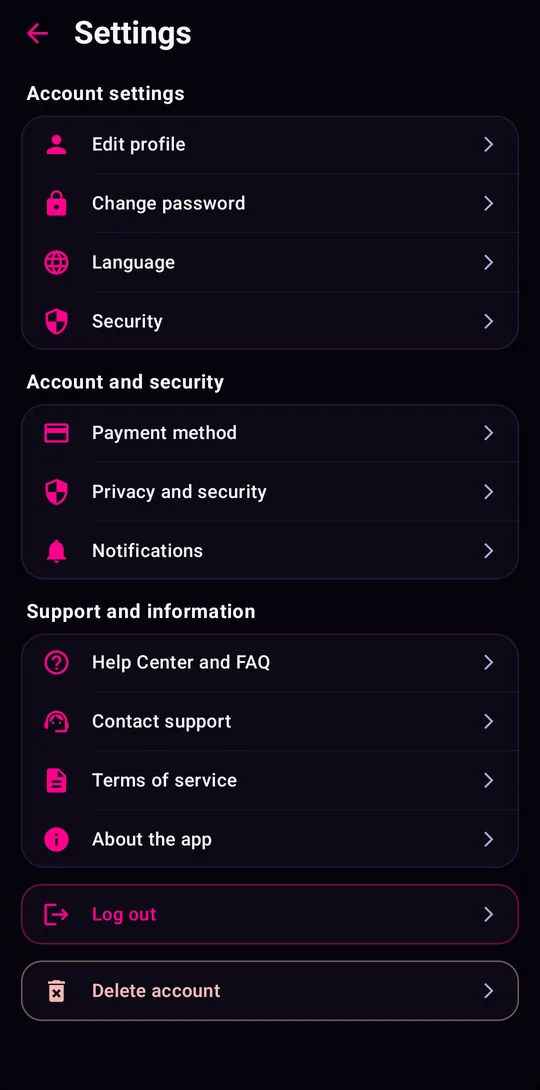
- Tap Profile, then the settings icon (⚙).
- Scroll to the bottom and tap Delete account (Profile›Settings›Delete account).
- Confirm. Your account is deactivated immediately and data is deleted within the period below.
Option 2 — Without the app (email request)
If you’ve uninstalled the app or can’t sign in, send us a request. Fill in the form (it opens your email app with the message ready) or write directly to privacy@dancefinders.com from the email linked to your account.
We acknowledge within 7 days and complete deletion within 30 days. We may ask for extra confirmation if the request doesn’t come from the account email.
What is deleted
| Data | What happens |
|---|---|
| Email, password, name, city, profile photo and Google account link (if used) | Deleted |
| Favourites, favourite styles, agenda (Interested/Going/Danced), attendance history and settings | Deleted |
| Support messages linked to the account | Deleted, unless needed for an open request |
| Events published as an organiser | Removed from the app, or kept without any link to personal data if you want the listing to stay (say so in your request) |
What may be kept, and for how long
| Data | Period | Reason |
|---|---|---|
| Server technical logs (IP, date, version) | Up to 30 days | Security and abuse prevention |
| Backups | Up to 90 days | Data disappears as backups are rotated |
| Data required by law | Applicable legal period | Legal obligations |
Location data is never stored, so there is nothing to delete there. More in the Privacy Policy.